
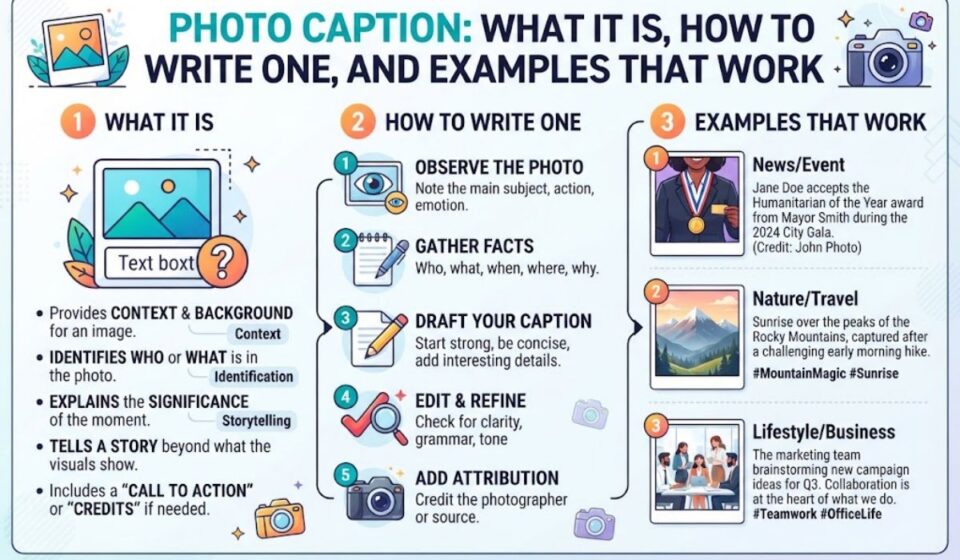

A photo caption is a short line of text placed near an image. It tells viewers who is in the photo, what is happening, and why it matters. A good caption adds details the picture cannot show on its own.
Writing a strong caption is easier than you think. You only need to know your audience, share the key facts, and keep it simple. In this guide, you will learn what a photo caption is, how to write one step by step, and see examples that really work.
What Is a Photo Caption?
Answer block: A photo caption is a brief piece of text placed beside or below an image that identifies the subject, adds context, or shares a message. Good captions answer who, what, where, and when, usually in one to two sentences, and they add details the picture alone cannot show.
Captions have been part of print journalism for over a century. Today they matter just as much online, where they affect engagement, accessibility, and even search visibility.
Quick Reference: Photo Caption at a Glance
| Element | Details |
| Purpose | Explain, identify, or add emotion to an image |
| Ideal length (editorial) | 1 to 2 sentences |
| Ideal length (social media) | 1 to 3 short lines, up to 150 characters before truncation on some platforms |
| Placement | Below or beside the image |
| Core questions answered | Who, what, where, when, why |
| Tone | Matches the platform and audience |
| Common formats | Descriptive, humorous, quote-based, storytelling |
Table of Contents
- Why photo captions matter
- Photo caption vs. alt text vs. credit line
- Types of photo captions
- How to write a photo caption in 6 steps
- Photo caption examples by platform
- Common mistakes and do’s and don’ts
- Conclusion
Why Photo Captions Matter
People read captions more than body text. Eye-tracking studies in journalism have shown for years that readers glance at images first, then jump to the text beneath them. That small line gets a lot of attention.
A strong caption does four jobs:
- Adds context that the image can’t show on its own
- Improves engagement by inviting comments, shares, and saves
- Supports accessibility when paired with proper alt text
- Builds trust by naming people, places, and sources accurately
On social platforms, a good caption can also nudge people to stop scrolling. On websites, it helps readers understand your page faster and gives search engines extra context about the image.
Photo Caption vs. Alt Text vs. Credit Line
These three get mixed up all the time. They serve different people and different purposes.
| Feature | Photo Caption | Alt Text | Photo Credit |
| Who sees it | Everyone | Screen reader users and search engines | Everyone |
| Main job | Add context or emotion | Describe the image visually | Name the photographer or source |
| Visible on page? | Yes | No (hidden in code) | Yes |
| Typical length | 1 to 2 sentences | Under 125 characters | A few words |
| Example | “Volunteers plant 500 trees along the river bank.” | “Group of volunteers planting saplings near a river” | “Photo: Sara Khan” |
Think of it this way: alt text describes, captions explain, and credits attribute. Use all three when you publish an image online.
Types of Photo Captions
Not every caption needs to be serious or formal. The best type depends on where the photo lives and who’s reading.
Descriptive Captions
These state the facts plainly. You’ll see them in newspapers, textbooks, and reports. They name people, places, and events without extra flair.
Example: “Students line up outside the Lahore Fort during a school trip, March 2025.”
Creative or Witty Captions
Common on Instagram and personal blogs. They use humor, wordplay, or personality to match the mood of the photo.
Example: “Monday called. I let it go to voicemail.”
Storytelling Captions
These go longer and share the moment behind the shot. They work well for travel, family, and brand content.
Example: “We almost missed this sunrise because the car wouldn’t start. Best breakdown of my life.”
Quote-Based Captions
A short quote that fits the image’s mood. Keep it brief, and credit the speaker if it isn’t yours.
Instructional Captions
Used in how-to guides and product pages. They point out what to notice in the image.
Example: “Hold the camera at eye level to avoid distorted proportions.”
Comparison of Caption Types
| Caption Type | Best For | Tone | Typical Length | Risk |
| Descriptive | News, reports, education | Neutral | 1 to 2 sentences | Can feel dry |
| Creative/Witty | Social media, personal blogs | Playful | 1 line | May confuse readers |
| Storytelling | Travel, brands, family posts | Warm | 3 to 6 lines | Gets too long |
| Quote-based | Inspirational posts | Reflective | 1 to 2 lines | Cliché or misattributed |
| Instructional | Tutorials, product pages | Helpful | 1 sentence | Too technical |
How to Write a Photo Caption in 6 Steps
You don’t need a journalism degree. Follow this process and your captions will improve fast.
Step 1: Know Your Audience
A caption for LinkedIn sounds different from one for a family album. Decide who will read it before you type a word.
Step 2: Answer the Basic Questions
Cover the who, what, where, and when. If the image is part of a news piece or report, this is non-negotiable. Verify every name and date.
Step 3: Add What the Photo Can’t Show
Don’t repeat what’s obvious. If the photo shows a woman smiling at a podium, “Woman smiling at podium” tells nobody anything. Say who she is and why the moment matters.
Step 4: Keep It Short and Specific
Cut filler words. Replace vague phrases with exact details.
- Weak: “A beautiful view of the mountains.”
- Strong: “Sunrise over the Hunza Valley, 5:42 a.m., after a two-hour hike.”
Step 5: Match the Tone to the Platform
Formal for reports. Casual for social posts. Warm for personal stories. Your voice should feel consistent with everything else you publish.
Step 6: Read It Out Loud
If it sounds stiff when spoken, rewrite it. Good captions sound like something a real person would say.
Quick Writing Checklist
| Check | Question to Ask |
| Accuracy | Are names, dates, and places correct? |
| Context | Does it add something the image doesn’t show? |
| Length | Is it as short as it can be? |
| Tone | Does it fit the platform and audience? |
| Grammar | Any typos or awkward phrasing? |
| Credit | Is the photographer or source named when needed? |
Photo Caption Examples by Platform
Seeing real patterns helps more than theory. Here’s how captions typically change across platforms.
| Platform | Style | Sample Caption |
| Casual, personal | “Coffee first, adulting later. ☕” | |
| Conversational, story-led | “Dad’s 60th birthday. Three generations, one very crowded table.” | |
| Professional, insight-driven | “Our team after launching the new dashboard. Six months of work, one great afternoon.” | |
| News article | Factual, concise | “Firefighters respond to a warehouse blaze on Canal Road on Tuesday.” |
| Blog post | Informative, friendly | “The finished garden bed, three weeks after planting.” |
| Product page | Clear, benefit-focused | “The matte black finish resists fingerprints and scratches.” |
| Wedding album | Sentimental | “The moment everything felt real.” |
Short Caption Ideas for Everyday Photos
- “Golden hour never gets old.”
- “Nothing fancy, just a good day.”
- “Found this spot by accident. Staying a while.”
- “Same view, different mood.”
Use these as inspiration, not copy-paste. The best captions come from the moment itself, so add a detail only you would know.
Key Terms Related to Photo Captions
Understanding the vocabulary helps you work with editors, designers, and SEO tools.
| Term | Meaning |
| Cutline | Another word for a caption, mostly used in newspapers |
| Alt text | Hidden description for accessibility and search engines |
| Credit line | Text that names the photographer or agency |
| Headline caption | A bold lead-in phrase at the start of a caption |
| Image metadata | Data embedded in the file, like date, camera, and location |
| Hashtag | A tag used on social posts to group related content |
| Call to action (CTA) | A prompt that asks viewers to act, such as “Tell us your favorite below” |
Common Mistakes and Do’s and Don’ts
Even experienced writers slip up. Here’s what to watch for.
Common Mistakes
- Stating the obvious. If the image shows a dog, don’t write “A dog.”
- Guessing names or details. One wrong name can damage your credibility.
- Writing too much. A paragraph under a photo loses most readers.
- Skipping alt text. Captions don’t replace accessibility descriptions.
- Using the same style everywhere. A funny caption on a funeral photo is a bad idea.
- Forgetting credit. Using someone’s image without attribution can cause legal trouble.
Do’s and Don’ts
| ✅ Do | ❌ Don’t |
| Verify names, dates, and locations | Assume or guess details |
| Add context the image can’t show | Repeat what’s visible |
| Keep it short and clear | Write long, rambling blocks |
| Match tone to platform and subject | Force humor into serious topics |
| Credit photographers and sources | Use images without permission |
| Pair captions with descriptive alt text | Treat captions as a replacement for alt text |
| Proofread before publishing | Publish with typos or awkward phrasing |
Photo Captions and SEO
Captions aren’t a direct ranking switch, but they help in practical ways. Readers spend more time on pages with clear image context. Search engines also use surrounding text to understand what an image is about.
Here are a few smart habits:
- Use natural, relevant words in your caption, not stuffed keywords
- Write a descriptive file name like lahore-fort-sunset.jpg instead of IMG_4821.jpg
- Add alt text that complements the caption rather than copying it
- Place the caption close to the image so the connection is obvious
Write for people first. If it helps readers, it will usually help search engines too.
Frequently Asked Questions
How long should a photo caption be?
For editorial use, aim for one to two sentences. For social media, keep it to one to three short lines unless you’re telling a story.
Is a caption the same as alt text?
No. Captions are visible to everyone and add context. Alt text is hidden in the code and describes the image for screen readers and search engines.
Should every image have a caption?
Not always. Decorative images can go without. But any photo that supports your point, shows a person, or documents an event benefits from one.
Can I use humor in a caption?
Yes, when the topic and audience allow it. Avoid jokes on sensitive subjects like accidents, loss, or news events.
Conclusion
A photo caption is small, but it carries real weight. It tells viewers what they’re seeing, why it matters, and how to feel about it.
Keep your captions accurate, specific, and short. Add what the image can’t show, match your tone to the platform, and always credit your sources. Pair each caption with solid alt text, and you’ll serve both your readers and search engines.