
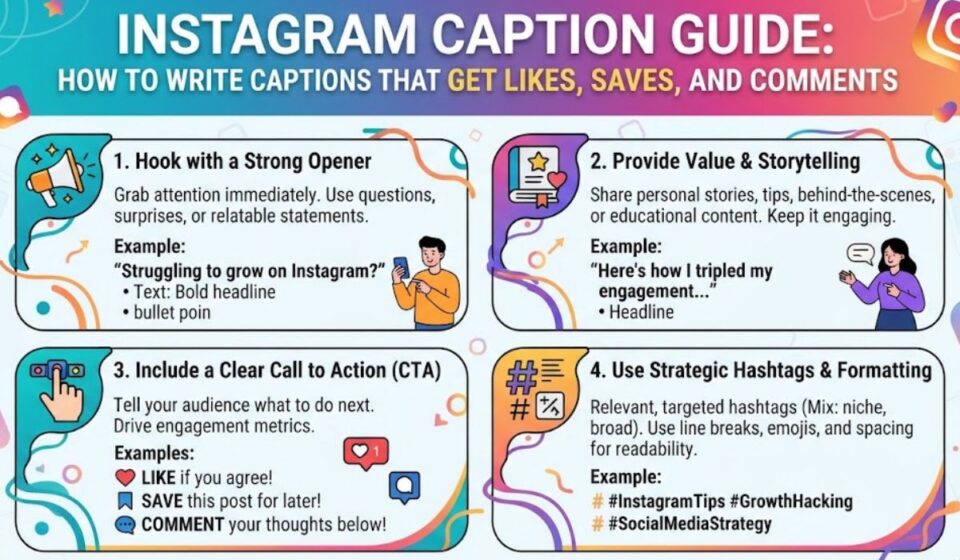

A great photo can stop the scroll. But a great caption makes people stay. It gives your post a voice and a reason to care.An Instagram caption is the text under your photo or Reel. It can be up to 2,200 characters long.
But only the first 125 or so show before the “more” link. That is why your first line matters most.This guide shows you how to write captions in simple steps. You will learn easy formulas, hashtag tips, and sample lines. Read on and write captions that earn more likes, saves, and comments.
Quick Answer: What Is an Instagram Caption?
An Instagram caption is the text under a photo, carousel, or Reel. It explains the post, adds personality, and can guide action. Captions can run up to 2,200 characters, but only about the first 125 show before the “more” link.
At a Glance Summary
| Question | Short Answer |
| Maximum caption length | 2,200 characters |
| Visible before “more” | About 125 characters |
| Bio limit | 150 characters |
| Do hashtags count? | Yes, including the # symbol |
| Best first step | Write a strong first line |
| Ideal tone | Match your voice and your audience |
What This Guide Covers
- Caption length and limits
- Types of captions and when to use them
- A simple step by step writing method
- Formulas, examples, and hashtag tips
- Common mistakes and do’s and don’ts
How Long Should an Instagram Caption Be?
Instagram captions can be up to 2,200 characters, which is roughly 300 to 400 words. That space is useful, but you do not have to fill it. Short captions often work well when the picture already tells the story.
The most important part is the start. Only about 125 characters show in the feed before the “more” link, so treat that first line as your hook. Put the key idea, question, or promise there.
Reels are even tighter. Some guides report that the caption preview in the Reels tab shows only about 55 to 60 characters. Keep Reel hooks short and punchy.
| Caption Type | Best Length | Use When |
| Short | 1 to 2 lines | The photo speaks for itself |
| Medium | 3 to 6 lines | You share a quick story or tip |
| Long | 10+ lines | You teach, explain, or share a deep story |
| Reel caption | 1 short hook plus a line | Video is the main content |
Types of Instagram Captions
Different posts need different styles. Pick the type that fits your goal. This helps you stay clear and avoid rambling.
| Type | Goal | Example |
| Witty | Entertain | “Coffee first, plans later.” |
| Inspirational | Motivate | “Small steps still count as progress.” |
| Storytelling | Connect | “Last year I almost quit. Today I launched.” |
| Educational | Teach | “3 tips to edit photos in under a minute.” |
| Question | Start a chat | “Which view wins: beach or mountain?” |
| Promotional | Sell or invite | “New menu is live. Come say hi this weekend.” |
| Minimal | Show style | “Golden hour.” |
Personal vs Business Captions
Personal captions can be playful and casual. Business captions should be clear and helpful. A brand should also explain what the post offers and what the reader can do next.
| Account Type | Tone | Focus |
| Personal | Casual and fun | Mood, memories, humor |
| Creator | Friendly and expert | Value, stories, community |
| Business | Clear and helpful | Product, offer, trust |
| Brand | Consistent voice | Identity and values |
How to Write an Instagram Caption Step by Step
You do not need to be a writer. A simple process works well every time. Follow these steps and your captions will improve fast.
- Know the goal. Do you want likes, saves, comments, clicks, or sales?
- Write a strong first line. Use a question, bold claim, or short story.
- Add value. Share a tip, a feeling, or a useful detail.
- Use simple words. Short sentences are easy to read on a phone.
- End with a call to action. Ask a question or tell people what to do.
- Add hashtags. Choose a few that match your post.
- Read it aloud. Cut any line that feels like filler.
Good captions are clear, not complicated. One of the most useful rules is to put the useful part before the cutoff, such as the offer, result, question, or reason to care.
Caption Formulas That Work
Formulas save time. They give you a simple frame so you never stare at a blank box. Here are common ones.
| Formula | Structure | Example |
| Hook, Story, CTA | Grab, share, ask | “I almost skipped this trip. Best choice ever. Where should I go next?” |
| Problem, Solution | Pain point, fix | “Tired of messy desks? Here’s my 5 minute reset.” |
| List | Numbered tips | “3 ways to make your mornings easier.” |
| Question | Ask and invite | “Tea or coffee? Tell me in the comments.” |
| Before, After | Show a change | “Day 1 vs Day 30. Small habits add up.” |
| Behind the Scenes | Show the process | “Here’s how this post came together.” |
Instagram Caption Ideas by Occasion
Sometimes you just need a spark. Use these short lines as a starting point, then add your own twist. These are original examples to help you brainstorm.
| Occasion | Sample Caption |
| Selfie | “Good light, good mood.” |
| Travel | “Found a new favorite corner of the world.” |
| Food | “Dinner looked too good not to share.” |
| Friends | “Same chaos, better company.” |
| Workout | “Showed up. That’s the win.” |
| Birthday | “Another lap around the sun, feeling grateful.” |
| Sunset | “Today ended in gold.” |
| Business launch | “It’s here. Thank you for being part of it.” |
Tips for Using Ideas
- Swap in your own details, like a place or name
- Keep the tone close to how you speak
- Avoid copying the same line on every post
Hashtags, Emojis, and Calls to Action
Small extras can boost a good caption. Use them with care so the post stays clean.
Hashtags
Hashtags count toward your caption limit, including the # symbol. Instagram has been listed as allowing up to 30 hashtags per post, but sources vary on current rules. Many current guides suggest 3 to 8 targeted hashtags over using the maximum. Always check the app for the latest limit.
Emojis
Emojis add color and emotion. They also count as characters. Use a few that match the tone, and avoid filling every line.
Calls to Action
A call to action tells readers what to do next. It can be simple.
| Goal | CTA Example |
| Comments | “Tell me your favorite below.” |
| Saves | “Save this for later.” |
| Shares | “Send this to a friend who needs it.” |
| Clicks | “Tap the link in bio.” |
| Follows | “Follow for more daily tips.” |
Caption Tips for Reels and Carousels
Format changes how people read. Reels move fast, so the words should support the video. Carousels invite swiping, so the caption can set up the story.
| Format | Caption Strategy |
| Single photo | Short hook plus one thought |
| Carousel | Tease what is inside, then ask for saves |
| Reel | Brief hook, one clear line, light hashtags |
| Story | Short on screen text, quick prompts |
| Live replay | Summary plus key takeaways |
Key Terms Related to Instagram Captions
| Term | Meaning |
| Caption | Text under a post |
| Hook | The first line meant to grab attention |
| CTA | Call to action |
| Hashtag | A tagged keyword that starts with # |
| Alt text | A text description of an image for accessibility |
| Engagement | Likes, comments, saves, and shares |
| Truncation | The “more” cutoff in the feed |
| Character count | Total letters, spaces, emojis, and symbols |
Common Mistakes and Do’s and Don’ts
Many captions fail for simple reasons. Fix these and your posts will read better.
Common Mistakes
- Burying the main point. Readers may never tap “more.”
- Using too many hashtags. They clutter the caption and use up characters.
- Writing long blocks of text. Add line breaks for easy reading.
- Skipping a call to action. Readers need a next step.
- Copying captions. Your audience can tell.
- Ignoring accessibility. Add alt text so everyone can enjoy your post.
Do’s and Don’ts
| Do | Don’t |
| Lead with a strong first line | Start with a long intro |
| Use simple, friendly words | Use jargon or filler |
| Add line breaks and short paragraphs | Post one dense block |
| Ask a clear question | Leave readers guessing |
| Keep hashtags relevant | Stuff in unrelated tags |
| Proofread before posting | Rush and publish typos |
Frequently Asked Questions
What is an Instagram caption?
It is the text under a photo, carousel, or Reel. It adds context, personality, and a call to action.
How many characters can an Instagram caption have?
Up to 2,200 characters, including spaces, emojis, and hashtags.
How long is the visible part of a caption?
About 125 characters show in the feed before the “more” link.
How many hashtags should I use?
Many guides suggest 3 to 8 relevant tags. Check the app for the current maximum.
What makes a good Instagram caption?
A strong first line, simple words, real value, and a clear next step.
Should I write long or short captions?
Use short captions when the visual says it all. Use long ones to teach or tell a story.
Can I edit a caption after posting?
Yes. You can edit it from the post menu at any time.
Conclusion
A great Instagram caption is simple. It starts with a strong hook, adds real value, and ends with a clear next step. Remember the limits: up to 2,200 characters, but about 125 show before the “more” link, so put your best words first.
Use the formulas and tables above to write faster. Match your tone to your audience, keep hashtags relevant, and always proofread. With a little practice, every post can sound like you and bring people into the conversation.