
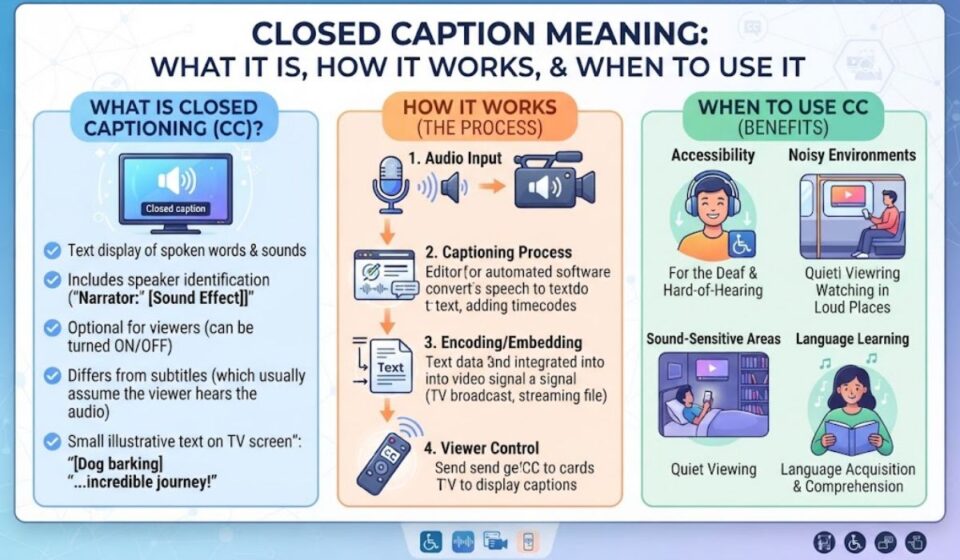

Have you ever pressed the CC button and wondered what it does? Words appear at the bottom of the screen. These words are called closed captions.Closed captions show the speech and important sounds in a video. You can turn them on or off.
They help people who are deaf or hard of hearing, and anyone watching without sound.This guide explains the closed caption meaning in simple words. You will learn how captions work, how they differ from subtitles, and when to use them. Read on and understand captions with ease.
Quick Answer: What Does Closed Caption Mean?
Closed captions are on-screen text that represent all audio in a video, not just spoken words. Viewers can turn them on or off. They help people who are deaf or hard of hearing, and anyone watching without sound.
At a Glance Summary
| Question | Short Answer |
| What does CC stand for? | Closed Captions |
| What do they show? | Speech, speaker names, and sound cues |
| Can I turn them off? | Yes, that is why they are “closed” |
| Who needs them most? | Deaf and hard of hearing viewers |
| Who else uses them? | People in noisy places, language learners, and sound off viewers |
| Different from subtitles? | Yes, they show more than the spoken words |
What This Guide Covers
- The meaning of “closed” in closed captions
- Captions vs subtitles vs SDH vs open captions
- What a caption track includes
- How to turn captions on
- Real life examples and common mistakes
Closed Caption Meaning Explained
The word “closed” means the text is hidden until you choose to show it. It is a separate track that you can switch on or off. This is the opposite of open captions.
The word “caption” means a text version of the sound. That includes dialogue and also important noises. A caption might say “[door slams]” or “[soft music]” so a viewer who cannot hear still gets the full scene.
Closed captioning is the American term for closed subtitles meant for people who are deaf or hard of hearing. In the UK, people often say “subtitles” for the same idea.
| Word | Meaning |
| Closed | Hidden until the viewer turns it on |
| Caption | Text that shows speech and sounds |
| CC | The short label on buttons and menus |
| Track | A separate text file that plays with the video |
What Do Closed Captions Include?
Good captions go beyond a simple transcript. They tell you who speaks and what you would hear. This helps the viewer follow the story with no audio.
Closed captions include dialogue, speaker IDs, and sound effects for viewers who cannot hear. Captions are often placed on different parts of the screen to help viewers tell speakers apart.
Typical Caption Elements
| Element | Example |
| Dialogue | “Where are you going?” |
| Speaker label | “MARIA: I’ll be right back.” |
| Sound effect | [thunder rumbles] |
| Music cue | [upbeat music playing] |
| Tone note | [whispering] |
| Off screen voice | “NARRATOR: Years later…” |
Closed Captions vs Subtitles vs SDH vs Open Captions
These four terms get mixed up all the time. Two simple questions sort them out. What does the text contain? Can the viewer turn it off?
Captions versus subtitles describes what the text contains, and open versus closed describes whether the viewer can turn the text off. That is the key idea.
Subtitles are designed for viewers who can hear but do not understand the language. Captions assume the viewer cannot hear the audio.
Comparison Table
| Feature | Closed Captions | Subtitles | SDH | Open Captions |
| Assumes viewer can hear? | No | Yes | No | No |
| Includes sound cues? | Yes | Usually no | Yes | Often yes |
| Can be turned off? | Yes | Yes | Yes | No |
| Main purpose | Accessibility | Language help | Accessibility plus translation | Always visible text |
| Typical use | TV, streaming | Foreign films | Streaming platforms | Social media clips |
What Is SDH?
SDH stands for Subtitles for the Deaf and Hard of Hearing. Closed captions are an encoded broadcast track, while SDH is a subtitle format file built for platforms that do not support older caption tracks.
SDH can be translated into other languages and keep its accessibility details. To a viewer, SDH and closed captions look and feel very close.
What Are Open Captions?
Open captions are burned into the video, so they are always visible and cannot be turned off. Muted autoplay is the default on major social platforms, which is why open captions became standard there.
How Closed Captions Work
Closed captions travel with the video as a separate stream of text. Your TV, app, or player reads that stream and draws the words on screen. If you switch captions off, the text simply stops showing.
There are two main ways to make them. People can type them from a script or recording, or software can create them with speech recognition. Automatic captions are generally less accurate than human typed ones.
Live shows add another problem. Real time captions usually lag behind the audio by several seconds because of transcribing, encoding, and sending time.
| Method | Speed | Accuracy | Best For |
| Human written | Slower | High | Films, series, training videos |
| Automatic speech to text | Fast | Medium | Quick drafts, live streams |
| Human live captioner | Real time | High | News and events |
| Auto plus human edit | Medium | High | Online courses and brand videos |
How to Turn On Closed Captions
Most devices have a quick setting. Look for the CC icon or an Accessibility menu. Steps vary by brand and app version.
| Where | Where to Look |
| TV remote | Press the CC button or open Settings, then Accessibility |
| YouTube | Tap the CC icon in the video player |
| Netflix and similar apps | Open the Audio and Subtitles menu |
| iPhone | Settings, Accessibility, Subtitles and Captioning |
| Android | Settings, Accessibility, Caption preferences |
| Video calls | Look for a Captions or Live transcript button |
You can often change the font, color, and size. This makes the text easier to read for your eyes.
Who Uses Closed Captions?
Captions began as an accessibility tool. Today, many people use them every day. They help in more ways than most viewers expect.
- Deaf and hard of hearing viewers: captions give full access to the story
- People in noisy places: buses, gyms, and airports
- Quiet viewers: parents with sleeping babies and late night watchers
- Language learners: reading helps with new words
- Viewers with accents or fast dialogue: captions improve clarity
- People with focus needs: text can help attention and memory
Closed captions are required for practically all programming in the United States. Rules differ by country, so check local guidance if you publish video.
Real Life Examples of Closed Captions
Examples show how captions make a difference. Here are a few common situations.
| Situation | How Captions Help |
| Watching TV at night | Keep the volume low without missing lines |
| Scrolling social media | Understand a muted video at a glance |
| Online class | Catch key terms and names |
| Watching a foreign accent drama | Follow fast or unclear speech |
| Hospital waiting room | Read news on a silent screen |
| Work video call | Follow a speaker with a poor connection |
A Simple Story Example
Imagine you are on a train with no headphones. A friend sends you a video clip. You tap the screen, and the captions are already on.
You read the speaker’s words and see “[audience laughs].” You get the joke without sound. That small detail shows why captions are more than a transcript.
Key Terms Related to Closed Captions
| Term | Meaning |
| CC | Short label for closed captions |
| Subtitles | Text for viewers who can hear but need translation |
| SDH | Subtitles for the Deaf and Hard of Hearing |
| Open captions | Text burned into the video |
| Transcript | A text record of speech, not synced to the video |
| Sidecar file | A separate caption file stored beside the video |
| Live captioning | Captions created during a live event |
| Accessibility | Making content usable for everyone |
Common Mistakes and Do’s and Don’ts
Many viewers and creators misuse caption terms. Small fixes make your content clearer and more inclusive.
Common Mistakes
- Calling every on screen text “subtitles.” Captions include sound cues.
- Trusting auto captions blindly. They can miss names and technical words.
- Skipping sound descriptions. Deaf viewers lose important context.
- Using tiny or low contrast text. The words become hard to read.
- Burning in captions when viewers need a choice. Open captions cannot be turned off.
- Forgetting live events. Plan captioning before the event starts.
Do’s and Don’ts
| Do | Don’t |
| Review and edit auto captions | Publish raw auto captions |
| Add speaker names and sound cues | Show only spoken words |
| Use clear, high contrast text | Place text over busy backgrounds |
| Offer closed captions for flexibility | Burn text in unless needed |
| Test captions on phone and TV | Assume one device shows them all |
Frequently Asked Questions
What does closed caption mean?
It means on-screen text that shows speech and sounds. Viewers can turn it on or off.
What does CC mean on a remote?
CC stands for closed captions. Press it to show or hide the text.
Are closed captions the same as subtitles?
No. Subtitles help with language, while captions also describe sounds for people who cannot hear.
What is the difference between open and closed captions?
Closed captions can be turned off. Open captions are part of the video and always show.
What does SDH mean?
SDH stands for Subtitles for the Deaf and Hard of Hearing. It works much like closed captions.
Why are closed captions used?
They give access to people who are deaf or hard of hearing. They also help in noisy or quiet places.
Are automatic captions accurate?
They are useful but not perfect. Human editing improves names, terms, and tone.
Conclusion
The closed caption meaning is simple. Closed captions are hidden text that you can switch on to read the speech and important sounds in a video. They make video accessible to people who cannot hear it, and they help many other viewers too.
Remember the key difference. Captions show everything you would hear, while subtitles mostly show spoken words in another language. If you make videos, edit your captions and add sound cues. If you watch, explore your settings and adjust the text so it works for you.