
You tap a small “CC” button, and words appear on the screen. Those words are closed captions. They help millions of people follow videos every day.A closed caption is a text version of the audio in a video. It shows speech, speaker names, and key sounds like music or laughter. You can turn it on or off.
It helps people who are deaf or hard of hearing, and anyone watching without sound.This guide explains closed captions in simple words. You will learn how to turn them on, what makes them good, and how to add them to your own videos. Read on and get started with ease.
Quick Answer: What Is a Closed Caption?
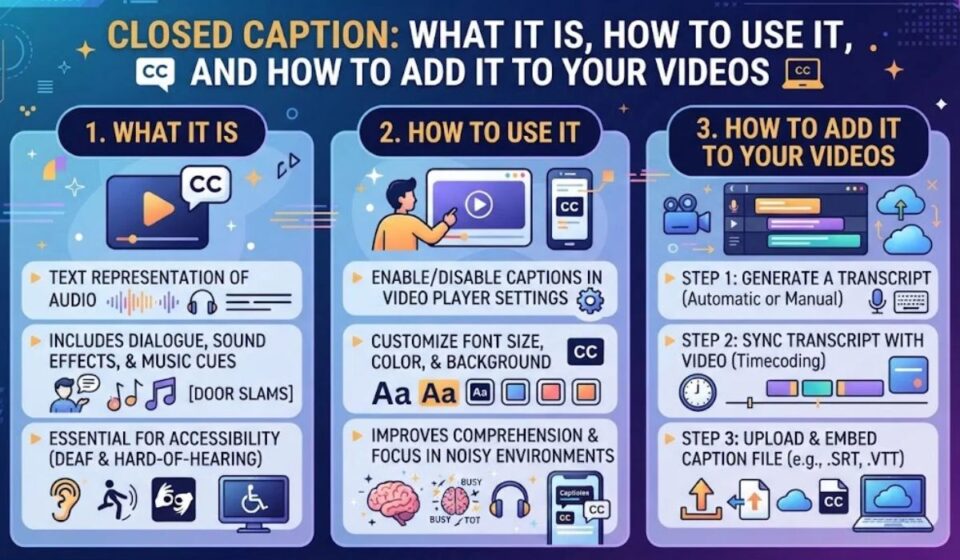
A closed caption is a text version of a video’s audio that viewers can turn on or off. It shows speech, speaker names, and key sounds like music or laughter. Closed captions help viewers who are deaf or hard of hearing, and anyone watching without sound.
At a Glance Summary
| Question | Short Answer |
| What does CC stand for? | Closed Caption |
| Can viewers turn it off? | Yes |
| What does it include? | Dialogue, speaker IDs, and sound cues |
| Main quality goals | Accuracy, timing, completeness, placement |
| Common file formats | SRT, WebVTT, SCC |
| Best for | Accessibility, noisy places, sound off viewing |
What This Guide Covers
- How closed captions work
- How to turn them on and off
- Quality standards and rules
- File formats and how to add captions
- Benefits, mistakes, and FAQs
How Closed Captions Work
Closed captions travel with the video as a separate text track. Your TV, app, or player reads that track and shows the words on screen. When you switch captions off, the track stays hidden.
Captions come from three main sources. People can type them by hand. Software can create them with speech recognition. Many teams mix both and have a person edit the software draft.
Live video adds a challenge. Real time captions can lag behind the speech, and errors are more likely. For recorded video, teams can edit and fix everything before release.
| Method | Speed | Accuracy | Best For |
| Human typed | Slower | High | Films, series, courses |
| Automatic (AI) | Fast | Medium | Drafts and quick clips |
| Human live captioner | Real time | High | News and events |
| AI plus human edit | Medium | High | Business and training videos |
How to Turn Closed Captions On or Off
Most devices make this easy. Look for the CC icon or an Accessibility menu. Menu names change with software updates.
| Device or App | Where to Look |
| TV remote | Press CC, or open Settings, then Accessibility |
| YouTube | Click or tap the CC icon in the player |
| Streaming apps | Open the Audio and Subtitles menu |
| iPhone | Settings, Accessibility, Subtitles and Captioning |
| Android | Settings, Accessibility, Caption preferences |
| Video calls | Find the Captions or Live transcript button |
Make Captions Easier to Read
Many devices let you change style. You can adjust the size, color, font, and background. Use high contrast, like white text on a dark box, to reduce eye strain.
Closed Captions vs Subtitles vs Open Captions
These terms are often mixed up. A simple rule helps. Captions assume the viewer cannot hear. Subtitles assume the viewer can hear but needs another language.
Open captions are burned into the picture, so viewers cannot turn them off. Closed captions can be switched on or off.
| Feature | Closed Captions | Subtitles | Open Captions |
| Can be turned off? | Yes | Yes | No |
| Includes sound cues? | Yes | Usually no | Often yes |
| Main purpose | Accessibility | Language help | Always visible text |
| Typical use | TV and streaming | Foreign content | Social media clips |
What Makes a Good Closed Caption?
Quality matters as much as having captions at all. The FCC lists four core standards for TV captions. They are accuracy, synchronicity, completeness, and placement.
Accuracy means captions match the spoken words and include sounds. Synchronicity means captions appear at the same time as the audio and stay on screen long enough to read. Completeness means captions run from start to finish. Placement means captions do not block important visuals.
Industry guides often point to 99% accuracy as the target for recorded content. Good captions also use correct spelling, grammar, and punctuation.
| Standard | What It Means | Example of a Fail |
| Accuracy | Words and sounds match the audio | Wrong names or missing sound cues |
| Synchronicity | Text matches the timing | Captions appear after the speaker finishes |
| Completeness | Captions cover the full video | Captions stop halfway |
| Placement | Text does not hide key visuals | Captions cover a face or on screen text |
| Readability | Clear font and good contrast | Tiny text on a busy background |
Closed Caption Rules and Laws
Many countries have rules about captions. In the US, the FCC requires captions on most TV programming. The CVAA extends this to online video that previously aired on TV, with captions of at least the same quality.
Web accessibility is also covered by WCAG, an international guideline set by the W3C. It is widely used as a best practice and has been built into many laws. The ADA is often cited for public facing video as well.
Rules change, and they differ by country and content type. If you publish video for a business, school, or public agency, check current rules or ask a legal or accessibility expert.
| Rule or Guide | Main Focus |
| FCC rules | Captions on US television programming |
| CVAA | Captions for online video that aired on TV |
| WCAG | Web accessibility guidelines |
| ADA | Equal access in the US |
| Local laws | Vary by country and sector |
Closed Caption File Formats
If you make videos, you will see file names like SRT and VTT. These are text files with timing codes. They tell the player what to show and when.
SRT is simple and portable. It carries no styling or screen positioning, so it may not meet strict broadcast needs. WebVTT is common on the web and allows more control. Broadcast work often uses formats like SCC.
| Format | Best For | Notes |
| SRT | Quick uploads and sharing | Simple, no styling |
| WebVTT (VTT) | Web video and HTML5 | Supports basic styling |
| SCC | TV and broadcast | Used in broadcast workflows |
| SBV | YouTube files | Simple, similar to SRT |
How to Add Closed Captions to Your Videos
Adding captions is easier than it looks. Most platforms let you upload a file or edit auto captions. Follow these steps.
- Get a transcript. Write one or use speech to text.
- Create a caption file. Add timing so each line matches the audio.
- Review and edit. Fix names, jargon, and punctuation.
- Add sound cues. Include music, laughter, and other key noises.
- Upload the file. Use the platform’s captions or subtitles section.
- Test on devices. Check phone, TV, and desktop.
Tools and Options
| Option | Cost | Best For |
| Built in platform captions | Free | Quick drafts |
| Caption editors | Free or paid | Creators and small teams |
| Professional services | Paid | High accuracy and compliance |
| AI plus human review | Mid range | Business videos at scale |
Benefits of Closed Captions
Captions began as an accessibility tool, but the benefits go far beyond that. They improve the viewing experience for many people.
- Accessibility: deaf and hard of hearing viewers can follow along
- Sound off viewing: works on silent phones and in public spaces
- Better focus: reading helps some people stay engaged
- Language learning: viewers see words as they hear them
- Clear speech: helps with fast talkers and strong accents
- Search value: a transcript gives search engines more text to read
| Viewer | How Captions Help |
| Deaf or hard of hearing | Full access to speech and sound |
| Commuter | Watch on the train without audio |
| Student | Catch terms and names |
| Parent | Watch quietly near a sleeping child |
| Non native speaker | Match spoken and written words |
Common Mistakes and Do’s and Don’ts
Many creators add captions but miss key details. Fix these and your videos get better fast.
Common Mistakes
- Trusting raw auto captions. They can miss names and technical terms.
- Skipping sound cues. Viewers lose context.
- Bad timing. Captions that lag or flash too fast are hard to read.
- Poor contrast. Light text on a light background disappears.
- Blocking visuals. Captions should not cover faces or on screen text.
- Forgetting live events. Plan captioning before you go live.
Do’s and Don’ts
| Do | Don’t |
| Edit auto captions | Publish raw drafts |
| Include speaker names and sound cues | Show only spoken words |
| Use clear font and contrast | Use tiny or fancy fonts |
| Keep lines short | Pack long blocks of text |
| Test on several devices | Assume it looks the same everywhere |
Frequently Asked Questions
What is a closed caption?
It is hidden text that shows the audio of a video. Viewers can turn it on or off.
What does CC mean?
CC stands for closed caption.
Are closed captions the same as subtitles?
No. Captions include sounds for viewers who cannot hear. Subtitles mainly translate speech.
How accurate should closed captions be?
Many industry guides aim for 99% accuracy on recorded content.
What file format should I use for captions?
SRT works for most uploads. WebVTT suits web video. Broadcast work may need SCC.
Do I need captions on social media videos?
Yes, if you want more people to understand them. Many viewers watch with the sound off.
Are auto captions enough?
They are a good start. Always review and fix errors before publishing.
Conclusion
A closed caption is more than extra text. It is a key tool for accessibility and a better viewing experience for everyone. Good captions are accurate, well timed, complete, and placed so they do not block the picture.
If you watch video, learn where the CC button lives on your devices. If you create video, start with a clean transcript, edit your captions, and test them on different screens. A few extra minutes can open your content to many more viewers.