
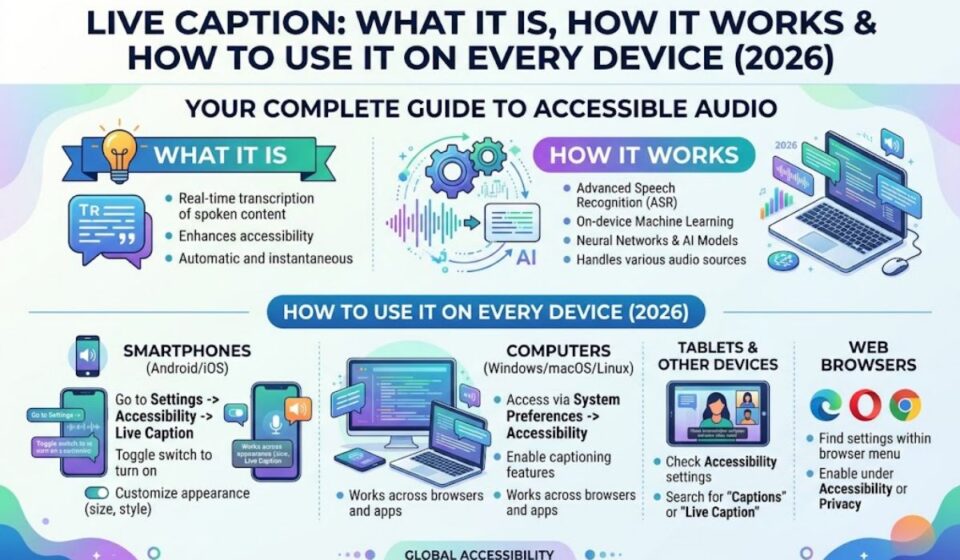

Ever watched a video with the sound off and still understood every word? That is Live Caption at work. It turns spoken audio into on screen text in real time. You do not need subtitles from the creator.
This guide explains how Live Caption works and where you can use it. You will learn how to turn it on for Android, Chrome, Windows, and Apple devices. You will also see who benefits most and get easy tips for better results. Menus can change after updates, so use the Settings search if something looks different.
Quick Answer: What Is Live Caption?
Answer block: Live Caption is an accessibility feature that automatically creates on-screen captions for audio playing on your device. It works on videos, podcasts, voice messages, and more, even if the content has no subtitles. It is available on supported Android phones, Chrome, Windows 11, and Apple devices, with some differences by platform.
Think of it as a built-in transcriber that follows your audio. You do not need to install a separate captioning app on most supported devices.
At-a-Glance Summary
| Item | Details |
| What it does | Shows real-time text for spoken audio |
| Works on | Videos, podcasts, streams, voice messages, some calls |
| Main platforms | Android, Chrome, Windows 11, iPhone, iPad, Mac |
| Cost | Included with supported devices and software |
| Internet needed | Often not, for basic captions on supported phones |
| Best for | Hearing loss, noisy places, quiet places, language learning |
| Common limit | Not every device or language is supported |
What’s in This Guide
- How Live Caption works
- Where it is available
- How to turn it on
- Who benefits most
- Live Caption vs subtitles and other tools
- Accuracy and privacy
- Tips for better results
- Common mistakes and do’s and don’ts
- FAQs and final thoughts
How Live Caption Works
Live Caption listens to the audio coming from your device. It uses speech recognition to turn words into text. The text then appears in a small box on your screen.
On supported phones, basic caption generation can run locally, so audio and captions are processed on the device. That means the feature can work even without an internet connection, which is a big plus for travel and low signal areas.
The Basic Process
| Step | What Happens |
| 1. Audio plays | A video, podcast, or message starts |
| 2. Speech is detected | The device picks out spoken words |
| 3. Text is created | Speech recognition converts words to captions |
| 4. Captions appear | A caption box shows the text on screen |
| 5. You read along | Text updates as the audio continues |
Captions usually lag by a moment. Music, background noise, and heavy accents can reduce accuracy.
Where Live Caption Is Available
Not every device has it. Support depends on your phone model, software version, and language.
Android
Live Caption works on Pixel phones and some other select Android phones, so your handset may not include it. It works even when the volume is muted, so captions still show on screen.
Google Chrome
On supported computers, Chrome can caption audio from videos, podcasts, games, livestreams, and video calls. The captions appear in a movable bubble. Chrome also lets you translate captions into more than 100 target languages, based on current documentation.
Windows 11
Live captions are available in Windows 11 after you install the 22H2 update. They work separately from your volume settings, so you can mute the computer and still see captions.
iPhone, iPad, and Mac
Apple offers Live Captions on supported devices. At one point, the iPhone version was in beta for iPhone 11 and later, with US English required. Apple’s support can expand over time, so check your own device’s Accessibility settings.
Platform Comparison
| Platform | Where Captions Appear | Notes |
| Android (Pixel and select phones) | Floating overlay | Can work offline for basic captions |
| Chrome (desktop) | Movable caption bubble | Offers caption translation options |
| Windows 11 | System caption bar | Needs 22H2 update or later |
| iPhone and iPad | On-screen caption view | Language and model limits apply |
| Mac | Caption window | Often limited to certain chips and regions |
How to Turn On Live Caption
The steps are short. Menu names can vary, so use Settings search for “caption.”
On Android
- Open Settings.
- Tap Accessibility.
- Select Live Caption.
- Toggle Use Live Caption on.
On Pixel phones, you can tap the floating overlay to see more options, including a pause button. You can also use the caption icon under the volume slider on many devices.
In Chrome
- Click the three dots menu.
- Open Settings.
- Choose Accessibility.
- Toggle Live Caption on.
On Windows 11
Go to Settings > Accessibility > Captions and turn on live captions. You can also try the Win + Ctrl + L shortcut.
On iPhone or iPad
Open Settings > Accessibility and look for Live Captions. Switch it on if your device supports it.
Setup Summary Table
| Device | Path to Turn On |
| Android | Settings > Accessibility > Live Caption |
| Chrome | Settings > Accessibility > Live Caption |
| Windows 11 | Settings > Accessibility > Captions |
| iPhone and iPad | Settings > Accessibility > Live Captions |
| Mac | System Settings > Accessibility > Live Captions |
Who Benefits Most From Live Caption?
Live Caption started as an accessibility tool. Today, many people use it for everyday convenience.
- People who are deaf or hard of hearing: Gain access to audio without extra gear
- Commuters: Read videos in loud places
- Office workers: Watch clips silently at a desk
- Parents: Keep the sound low while kids sleep
- Language learners: See words as they hear them
- People with attention challenges: Reading along can help focus
Use Case Table
| Situation | Why Live Caption Helps |
| Noisy train or bus | You can follow content without headphones |
| Quiet library or office | You avoid disturbing others |
| Hearing loss | Text replaces missed words |
| Learning a language | Hearing and reading support each other |
| Late night viewing | No need to raise the volume |
Live Caption vs Subtitles vs Other Tools
People often mix these up. They are related, but they work differently.
| Feature | Created By | Works On | Needs Creator Support? |
| Live Caption | Your device | Many apps and media | No |
| Closed captions or subtitles | The creator or platform | One video or show | Yes |
| Captioned phone service | A provider | Phone calls for eligible users | Needs registration |
| Meeting captions | The meeting app | That app only | App feature required |
Subtitles made by a creator are usually more accurate. Live Caption is the backup when no subtitles exist. It is a convenience tool, not a guarantee of perfect text.
Accuracy and Privacy
Live Caption is good, but it is not perfect. Fast talkers, overlapping voices, music, and unusual names can cause errors. Do not rely on it for legal, medical, or safety critical information.
On privacy, device based processing keeps audio on your phone for basic captions. Translation features can depend on separate tools like Live Translate and on supported device and language combinations. Read your device’s privacy notes if you use translation or cloud features.
Accuracy Factors
| Factor | Effect on Captions |
| Clear speech | Higher accuracy |
| Background music | More mistakes |
| Heavy accents | Mixed results |
| Multiple speakers | Harder to follow |
| Technical terms or names | Often misspelled |
Tips for Better Live Caption Results
A few habits can improve what you see.
- Keep your software updated. Newer versions improve recognition.
- Pick the right language. Set your device and caption language to match.
- Reduce noise. Choose quieter audio when you can.
- Place the caption box well. Move it so it does not cover key content.
- Adjust text size. Larger text is easier to read quickly.
- Use real subtitles when available. They are usually more accurate.
Troubleshooting Table
| Problem | Likely Cause | Fix |
| Option missing | Device or version not supported | Update software or check supported models |
| No captions appear | Feature off or audio not supported | Toggle it on and test another video |
| Wrong words | Noise or accent | Use clearer audio or enable creator subtitles |
| Captions in wrong language | Language setting mismatch | Change the caption language |
| Box blocks the screen | Default position | Drag it to a new spot |
Common Mistakes and Do’s and Don’ts
Common Mistakes
- Assuming every phone has it. Support varies by model.
- Confusing it with YouTube subtitles. They are separate features.
- Trusting it for critical info. Always verify important details.
- Forgetting to update. Old software may lack the feature.
- Ignoring the language setting. A mismatch ruins accuracy.
Do’s and Don’ts
| ✅ Do | ❌ Don’t |
| Check device support before troubleshooting | Assume the feature is broken |
| Use Settings search for “caption” | Dig through every menu |
| Keep software updated | Ignore system updates |
| Use creator subtitles when available | Rely on auto captions only |
| Turn it off if it blocks your view | Leave it on when you do not need it |
Frequently Asked Questions
What is Live Caption?
It is a feature that creates real-time on-screen captions for audio playing on your device.
Does Live Caption work offline?
On supported phones, basic captions can work offline because processing happens on the device.
Which phones have Live Caption?
It works on Pixel phones and some other select Android phones. Check your model.
Is Live Caption available on Windows?
Yes. Windows 11 offers live captions after the 22H2 update.
Does Live Caption work in Chrome?
Yes. Chrome shows captions for audio and video in a movable bubble.
Can Live Caption translate languages?
Some platforms offer caption translation. Chrome lists more than 100 target languages.
Is Live Caption the same as subtitles?
No. Subtitles come from the creator. Live Caption is generated by your device.
Final Thoughts
Live Caption turns almost any audio into readable text. It supports people with hearing loss, helps in noisy or quiet places, and works across several platforms. The setup takes under a minute, and the benefits show up right away.
Check whether your device supports it, turn it on in Accessibility, and test it with a video. If captions are not accurate enough, pair them with real subtitles when you can. A small setting can make your whole device easier to use.