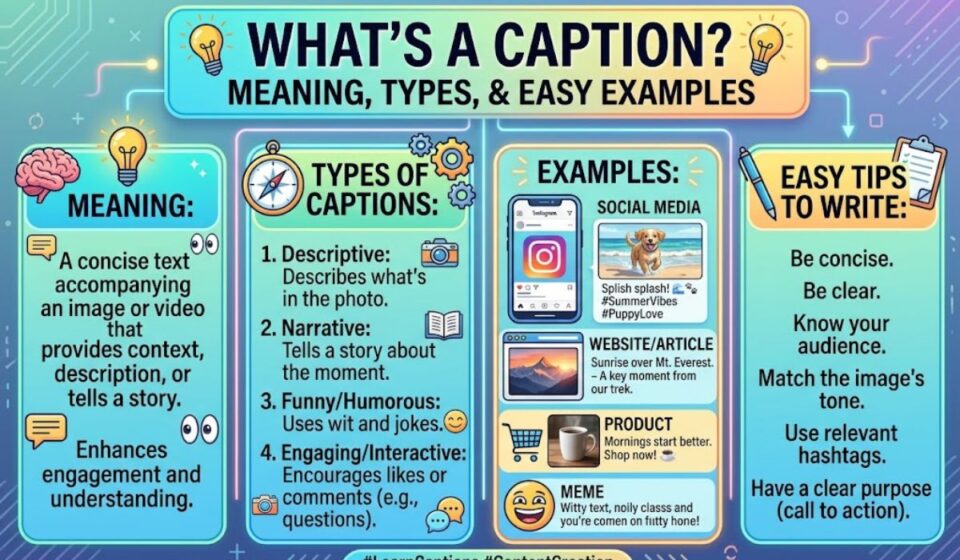

What’s a caption? It is a short piece of text that goes with a picture, video, or chart. It tells you what you are looking at. You see captions under news photos, on social media posts, and at the bottom of videos.
This guide explains the meaning of a caption in plain words. You will learn the main types and see easy examples. You will also pick up simple tips to write a good caption of your own.
Quick Answer: What Is a Caption?
A caption is a short piece of text that goes with a picture, video, chart, or document. It explains what the viewer sees or adds helpful context. In video, captions also show spoken words and sounds as text. On social media, a caption is the text you write under your post.
Overview at a Glance
Use this map to jump to the part you need.
| Section | What you will learn |
| Simple meaning | A clear definition with examples |
| Word origin | Where the word comes from |
| Types of captions | Photo, social, video, legal, and more |
| Caption vs subtitle vs alt text | How the three differ |
| How to write one | A simple step by step method |
| Mistakes | What to avoid |
Caption Quick Reference Table
| Detail | Information |
| Word | Caption |
| Part of speech | Noun and verb |
| Pronunciation | KAP shun |
| Plural | Captions |
| Verb forms | Captioned, captioning |
| Core meaning | Short text that goes with a visual |
| Common places | News photos, social posts, videos, textbooks, court papers |
| Typical length | One or two sentences for a photo |
What’s a Caption in Simple Words
A caption tells the viewer what they are seeing. It sits near the image, often below it. It can name a person, describe an event, or add a joke.
Here is an easy example. Imagine a photo of a child blowing out candles. The caption reads, “Sam turns five at the family picnic.” Now the photo has a name, an age, and a place.
Caption also works as a verb. To caption a photo means to add that short text. You can caption a video, a meme, or a chart too.
Origin of the Word Caption
The word comes from a Latin root linked to taking or seizing. Long ago, legal papers about seized property began with a heading. People called that heading a caption.
Over time, the word moved from legal documents to chapter headings. Later it reached picture headings and film text. So a caption started as a label at the top of a page and ended up under your holiday photos.
Types of Captions
Captions change with the setting. The table gives a quick view before we look closer.
| Type | Where you see it | Main job |
| Photo caption | News, magazines, websites | Say who, what, when, and where |
| Social media caption | Instagram, Facebook, TikTok | Add voice, humor, or a call to action |
| Video caption | Films, online videos, live TV | Show speech and sounds as text |
| Figure or table caption | Textbooks, reports | Explain a chart or image |
| Legal caption | Court filings | Name the court, parties, and case |
Photo Captions
News and school books use these most. A good photo caption answers the basic questions in a line or two. It names the people, the place, and the moment.
School lessons often split them further. An identification caption only names the subject. An expanded caption adds more detail and background.
Social Media Captions
These are the words you type under a post. They set the tone. A caption can be funny, warm, or informative.
Many creators also add hashtags or a short question. This invites people to comment.
Video Captions
Video captions show spoken words as text. They often include sound cues such as laughter or music. This helps viewers who are deaf or hard of hearing.
They also help people watching with the sound off. That is common on phones in public places.
Legal Captions
In court papers, the caption is the heading at the top. It lists the court name, the parties, and the case number. It is a formal label, not a description of a picture.
Caption vs Subtitle vs Alt Text
These three terms get mixed up all the time. They look alike, but they do different jobs.
In the US, subtitles assume the viewer can hear the audio but needs a translation. Captions assume the viewer may not hear at all. In the UK, people often use the word subtitles for both.
| Feature | Caption | Subtitle | Alt text |
| Main purpose | Explain a visual or show audio as text | Translate spoken words | Describe an image for screen readers |
| Who sees it | Everyone | Everyone | Mostly screen reader users |
| Shows sound cues | Often yes | Usually no | Not applicable |
| Visible on page | Yes | Yes | Hidden in the code |
| Used with | Photos, charts, videos | Videos and films | Web images |
So a caption can sit beside alt text on the same image. One speaks to every reader. The other serves people who use assistive tools.
Closed Captions vs Open Captions
Video captions come in two forms. The difference is whether you can switch them off.
| Type | Can you turn it off? | Common use |
| Closed captions | Yes | TV, streaming apps, online video |
| Open captions | No, burned into the video | Social clips, public screens |
Closed captions give viewers control. Open captions guarantee that everyone sees the text.
Why Video Captions Matter
Captions make video more accessible. Accessibility rules for the web also expect captions on recorded video that has speech. They help people who are deaf or hard of hearing.
They also help in noisy rooms, quiet offices, and when someone learns a new language. Many viewers simply prefer to read along.
How to Write a Good Caption
A strong caption is clear, short, and useful. You do not need special skills. Follow these steps.
Step by Step Method
- Look at the visual. Notice who or what is in it.
- Find the message. Ask what the viewer should take away.
- Pick the right type. Choose informative, funny, or quote based.
- Write in simple present tense. “Maya hikes the trail” feels alive.
- Add one useful detail. Include a name, place, or date.
- Cut extra words. Keep it to one or two sentences.
- Read it aloud. If it sounds stiff, rewrite it.
Tone by Platform
The right voice depends on where the caption appears.
| Where | Best tone | Tip |
| News site | Neutral and factual | Name people and places |
| Textbook or report | Clear and formal | Number figures and refer to them in text |
| Instagram or Facebook | Friendly and personal | Start with a strong first line |
| Professional | Share a lesson or result | |
| Video | Accurate and timed | Match the speech and sounds |
Caption Examples
Real examples teach faster than rules. Here are a few for common situations.
| Situation | Example caption |
| News photo | Volunteers plant 200 trees along the riverbank on Saturday. |
| Family photo | Grandma’s famous cake, gone in ten minutes. |
| Travel post | Sunrise over the mountains. Worth the early alarm. |
| Chart in a report | Figure 2. Monthly sales rose after the spring campaign. |
| Video sound cue | [Applause] |
Notice how each one is short. Each one adds something the image cannot say alone.
Related Terms You Should Know
These words often show up near captions. Knowing them clears up a lot of confusion.
| Term | Meaning |
| Cutline | Another name for a photo caption in newsrooms |
| Legend | An older word for a caption, also a map key |
| Headline | The title of an article, not a caption |
| Credit line | The name of the photographer or source |
| Transcript | A full text version of spoken audio |
| Hashtag | A tagged keyword used in social captions |
Common Mistakes and Do’s and Don’ts
Most weak captions fail in the same few ways. Avoid these.
Mistakes to Avoid
- Repeating the obvious. “A dog on a couch” adds nothing if we can see it.
- Writing too much. A long paragraph hides the point.
- Skipping names. Readers want to know who is in the photo.
- Ignoring accuracy. Wrong names or dates hurt trust.
- Forgetting video captions. Many viewers cannot hear the audio.
Do’s and Don’ts
| Do | Don’t |
| Add context the image lacks | Describe only what is plain to see |
| Keep it short and clear | Pack in long sentences |
| Match the tone to the platform | Use the same voice everywhere |
| Check names, dates, and spelling | Guess facts |
| Caption videos for accessibility | Assume everyone has sound on |
Frequently Asked Questions
What’s a caption?
A caption is a short text that goes with a picture, video, chart, or document. It explains or adds context.
What is a caption on a photo?
It is the line or two beneath a photo. It tells viewers who, what, when, and where.
What is a caption on social media?
It is the text you write under a post. It sets the tone and often invites comments.
What is the difference between a caption and a subtitle?
Captions show speech and sounds for viewers who may not hear. Subtitles mainly translate speech.
What are closed captions?
Closed captions are video text that viewers can switch on or off. Streaming apps and TV use them.
What is a caption in a legal document?
It is the heading at the top. It names the court, the parties, and the case number.
How long should a caption be?
Keep most captions to one or two sentences. Social posts can run longer when the story needs it.
Conclusion
A caption is simple but powerful. It turns a plain image or clip into a clear message. It can inform, entertain, or open a video to more people.
To write a better one, look at the visual and find the message. Add one useful detail and cut the rest. Check your facts, match the tone to the platform, and your captions will do their job.